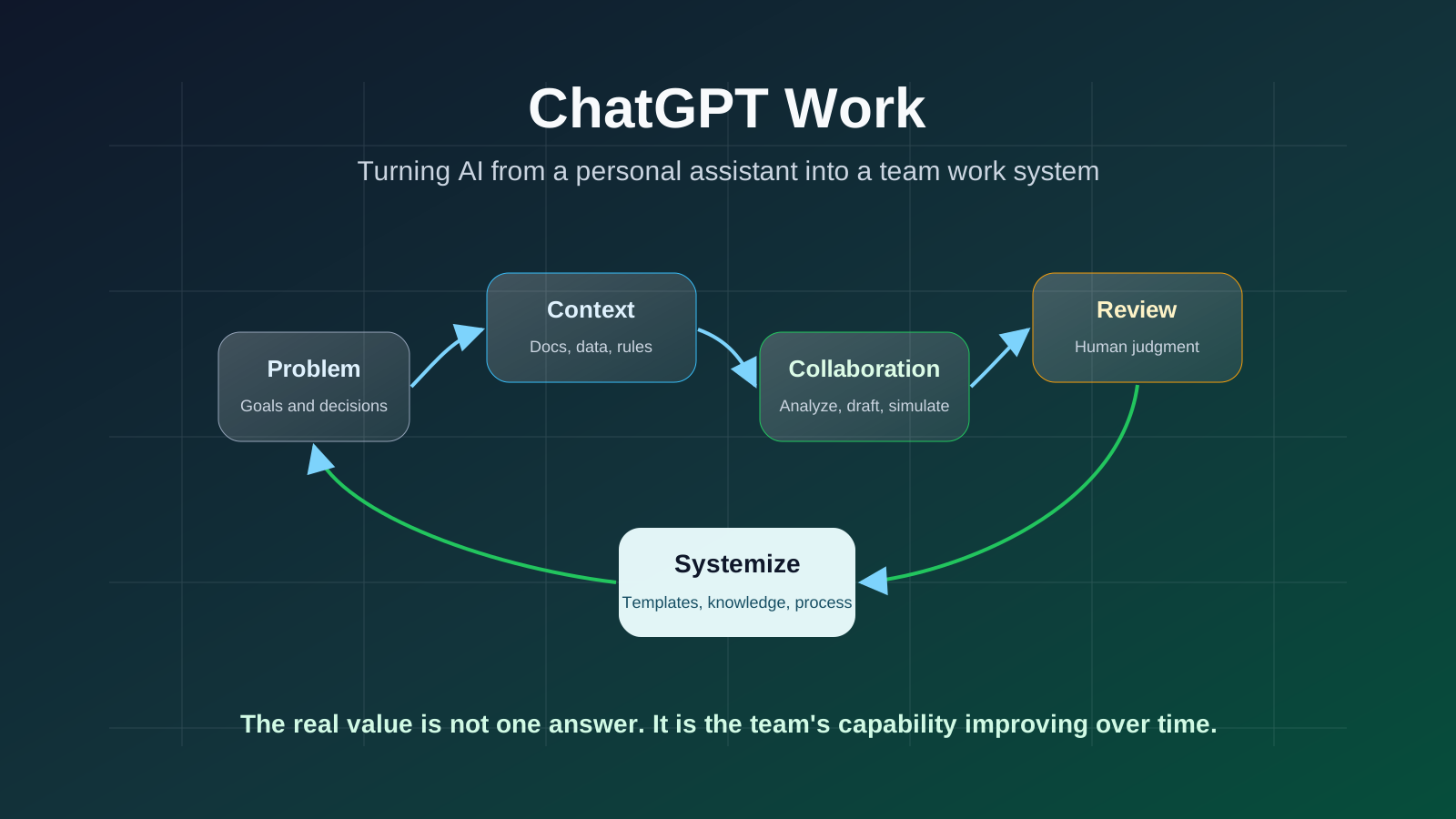
ChatGPT Work is not about giving everyone another chat window. It is about helping teams work around real problems, shared context, reusable workflows, and clear safety boundaries.
I saw a line that works well as the opening for this article:
I was so inspired reading all the DMs on how folks here use ChatGPT Work. Let’s try something else that will make the team smile. What’s a time you saw ChatGPT have a deeply positive impact on your or someone’s life?
The most important part is not “how people use ChatGPT Work.” It is the second question:
When have you seen ChatGPT have a genuinely positive impact on your life or someone else’s life?
If we bring that question into team work, the answer should not stop at “I used it to write some copy” or “I asked it to summarize a document.” The real value of ChatGPT Work is not giving everyone another chat window. It is helping a team understand problems faster, share context better, deliver more steadily, and turn good practices into reusable systems.
ChatGPT Work Is Not a Single Button
In this article, ChatGPT Work means the organized use of ChatGPT in work settings.
In OpenAI’s current product lineup, teams and companies may use ChatGPT Business, ChatGPT Enterprise, workspaces, admin controls, team sharing, custom GPTs, projects, files, data analysis, connectors, and related capabilities. Availability varies by plan and workspace configuration.
So do not treat ChatGPT Work as one fixed feature name.
More precisely, it is a way of working:
let ChatGPT participate in real workflows with team context, tools, and boundaries.
Personal ChatGPT use answers: how can I finish this task faster right now?
Team ChatGPT Work answers: how can we make this kind of work better every time?
Layer One: Start With Real Problems, Not Prompts
Many teams begin their AI rollout by collecting prompts.
That is useful, but not enough.
Prompts are not the starting point. Problems are.
Start by listing the most common, time-consuming, and error-prone work in the team:
- Too many meetings, and nobody wants to write notes.
- Lots of customer feedback, but no systematic classification.
- Product requirements are scattered, and engineering needs too much interpretation.
- Weekly reports and retrospectives become formalities.
- New employee onboarding depends on oral knowledge transfer.
- Sales, delivery, and engineering understand the same issue differently.
- Code reviews, solution reviews, and document reviews lack stable standards.
These are the places where ChatGPT Work should enter.
A good problem usually has three traits:
- It happens often.
- It needs context.
- The output can be reviewed by a human.
“Help me write a poem” is not a team work problem.
“Classify these 30 customer feedback items into product issues, delivery issues, training issues, and business risks, then propose next week’s priorities” is.
Layer Two: Feed It Context Instead of Letting It Guess
ChatGPT output quality depends heavily on context quality.
In team settings, you should not let it guess from thin air.
Give it:
- Background: what business situation this belongs to.
- Goal: what final output is needed.
- Role: which perspective it should use.
- Constraints: what it cannot do and what it must follow.
- Materials: relevant documents, meeting notes, data, and customer feedback.
- Standard: what good output looks like.
A weak request is:
Help me write a requirements document.
A better request is:
You are a product manager familiar with B2B admin systems. Based on the customer feedback and current workflow below, prepare a requirements document. Output background, problem, target users, core flow, field design, edge cases, acceptance criteria, and risks. Do not invent requirements the customer did not mention. List uncertain points separately as questions to confirm.
The difference is not merely that the prompt is longer. The context is richer and the boundaries are clearer.
Layer Three: Put ChatGPT Into Team Workflows
The most common mistake is that everyone experiments alone in their own chat window.
That can look busy in the short term, but it does not accumulate into team capability.
A better approach is to place ChatGPT inside fixed workflows.
For a product team:
- After customer interviews, ask ChatGPT to organize problems, direct quotes, frequency, and impact.
- Before requirements review, ask it to draft a PRD and list questions to confirm.
- Before engineering review, ask it to inspect implementation risks and boundary cases.
- After launch, ask it to summarize feedback, bug types, and next iteration ideas.
For an engineering team:
- Ask ChatGPT to explain unfamiliar modules.
- Ask it to generate an implementation plan from an issue.
- Ask it to inspect test coverage and edge cases.
- Ask it to help write change notes and rollback plans.
For an operations team:
- Summarize customer feedback.
- Generate tiered handling suggestions.
- Extract common questions.
- Produce SOPs and training materials.
The key question is not “who used AI.” It is “which workflow became more stable because of AI?”
Layer Four: Turn Good Uses Into Templates
ChatGPT Work starts creating team value when good usage becomes templates.
If one person finds a useful workflow, it should not stay in a private chat history. It should become a team template.
A template can include:
- Required input materials.
- Standard prompt.
- Output format.
- Checklist.
- Human review points.
- Things that are not allowed.
For example, a customer feedback analysis template may look like this:
Input:
- Original customer feedback.
- Customer type.
- Current product version.
- Relevant business context.

Output:
- Issue category.
- Scope of impact.
- Severity.
- Possible root cause.
- Suggested owner.
- Questions that need confirmation.

Human review:
- Did it exaggerate the customer's request?
- Did it treat one-off feedback as a general requirement?
- Did it miss business risk?
Now ChatGPT is no longer only a personal productivity tool. It becomes part of the team’s process.
Layer Five: Let It Draft First, While Humans Judge
The healthiest team mindset is:
let AI raise the starting point, not replace judgment.
ChatGPT is good at:
- First drafts.
- Summaries.
- Classification.
- Comparison.
- Checklists.
- Alternative options.
- Risk reminders.
It should not decide alone:
- Major people decisions.
- High-risk financial decisions.
- Medical, legal, or other professional conclusions.
- Actions that affect customer rights.
- Production changes without human review.
In a team, ChatGPT’s best role is not final owner. It is a high-quality collaborator.
It turns blank pages into drafts, scattered information into structure, and vague problems into questions to confirm.
Judgment still belongs to people.
Layer Six: Admins Need to Set Boundaries First
Team use of ChatGPT Work cannot depend only on individual caution.
Admins and team leads should define boundaries first:
- What data can be uploaded.
- What data cannot be uploaded.
- Which work ChatGPT may assist with.
- Which outputs require human review.
- Which GPTs or connectors can be used.
- How access changes are handled when someone leaves, permissions change, or a project ends.
OpenAI’s ChatGPT Business and Enterprise are built for organizational workspaces and provide admin, workspace, and team-use capabilities. Enterprise also emphasizes stronger security, privacy, and administrative controls. Specific capabilities vary by plan and workspace settings.
The principle is simple:
the closer a workflow gets to core company data or real actions, the clearer the permissions and review mechanisms must be.
Layer Seven: Measure Positive Impact, Not Just Usage Count
Many teams count how many people used AI.
That metric is too shallow.
Look at actual impact instead:
- Did requirement rework decrease?
- Are meeting notes more stable?
- Do new employees onboard faster?
- Is customer feedback handled more quickly?
- Are code reviews more complete?
- Are solution discussions more focused?
- Is repetitive work becoming templated?
Back to the opening question: what makes a team smile is not “everyone used ChatGPT.” It is that someone had less overtime, less anxiety, less repetitive work, or finished something that used to be hard to move forward.
That is the positive impact of ChatGPT Work.
A Simple Rollout Method: Three Weeks
If your team has not used ChatGPT Work systematically, start with three weeks.
Week one: pick only three high-frequency scenarios:
- Meeting notes.
- Customer feedback analysis.
- Requirements or solution drafts.
Week two: turn each scenario into a template:
- Input requirements.
- Prompt.
- Output structure.
- Human review points.
Week three: run a retrospective:
- Which scenarios saved time?
- Which outputs required heavy rework?
- Which data should not be uploaded?
- Which templates should be kept?
- Which workflows should be standardized further?
Do not aim for every person and every scenario at the beginning.
Make a few scenarios solid first.
Closing
The core of ChatGPT Work is not teaching everyone more prompts.
It is connecting problems, context, AI collaboration, human judgment, and reusable process.
In one sentence:
Personal ChatGPT use improves efficiency. Team ChatGPT Work turns good ways of working into reusable systems.
What is worth sharing is not “what I asked ChatGPT to write.”
It is:
At what moment did it make a person, a team, or a customer better off?
If a team designs its usage around that question, ChatGPT Work becomes more than a tool. It becomes a better collaboration habit.